Ask the owner of a café, a shop, a pharmacy counter or a small service desk how many people they put on a Saturday and the answer comes instantly: “three.” Ask why three and the answer is slower: “it’s always been three,” “two isn’t enough at lunchtime,” “we tried four once and they stood around.” All of those things can be true at the same time. Three is too few from eleven to two and too many from eight to ten and again after six, and the roster is paying for both mistakes at once — as wages for people with nothing to do in the quiet hours, and as customers who look at the queue at half past twelve and walk out.
This blog keeps returning to the same idea: replace gut feel with a number. The OTIF post asked what service looks like from the customer’s side of the fence and found the answer in the order data; the SPC post asked whether a variation was normal or a signal. This post asks the same kind of question about the roster. Queueing theory — the Erlang C formula that call centres have staffed with for a century, applied to the timestamps your till already records — turns “it’s always been three” into “Saturday at noon gets 64 customers an hour who take two and a half minutes each; three people are 94% busy, four in ten customers wait more than five minutes, the average wait is nearly thirteen minutes, and about 28 customers a week give up and leave. A fourth person from eleven to three, paid for by dropping the third person before ten and after six, fixes it for no extra wages.”
For a small or medium-sized company this is one of the few analyses where the number at the bottom is large relative to the size of the business. Wages are usually the biggest cost an SME can actually control, and the walk-outs are invisible — no one logs the customer who didn’t buy. The good news is that the data needed is the most basic data a counter-service business has: the time on each receipt, and how long each one took.
The traditional way this gets handled is by habit and complaint: the roster is copied from last month, and it changes when a member of staff says the lunchtime is unbearable or the owner notices two people chatting at nine in the morning. What’s missing is a number per hour of each weekday that says how many people the demand actually needs, what the current roster costs in idle wages and lost customers, and what a different promise to customers — 80% served within five minutes, or 90% — would cost.
What queueing analysis actually gives you
| Benefit | Why it matters for an SME |
|---|---|
| An arrival rate for every hour of every weekday | Each ticket timestamp is a customer arriving. Averaged over every Saturday in the data, the 12:00 slot has a mean and a spread. That replaces “Saturday lunch is busy” with “64 an hour, give or take 13.” |
| A service time measured, not assumed | The duration on each ticket says how long one staff member was busy. Takeaway takes two minutes, a return five; the mix in each slot sets the service rate the formula needs. |
| A hard floor on head-count | Offered load is arrivals per hour × mean service time in hours — the average number of staff who are busy serving. Below that number the queue grows without limit; it is not a target, it is the minimum. |
| The probability of waiting, and for how long | Erlang C gives, for c staff, the chance an arriving customer has to wait at all, the share served within a target time, and the average wait. It is the standard M/M/c queue and every input comes from the data. |
| The minimum staff that meets a stated promise | The smallest c such that at least 80% of customers start being served within 5 minutes (both configurable), per slot. A second figure uses mean + 1 standard deviation of arrivals — what a busy Saturday needs. |
| A price on both kinds of mistake | Idle time is staff-hours above requirement × fully loaded wage. Lost customers are those who would have waited longer than their patience (10 minutes by default), × average ticket × contribution margin. Total cost is the sum, and it is the number to compare rosters on. |
| The cost of a tighter or looser promise | The required roster is recomputed at 70%, 80%, 90% and 95% service-level targets, so the owner sees what a better queue costs per year — and where it stops being worth it. |
| Bad data never reaches the formula | A validation layer rejects tickets stamped at three in the morning, blank or unparseable timestamps, service times of zero or over an hour, unknown transaction types and negative values, each with a stated reason. |
A practical example, using this repo’s own results
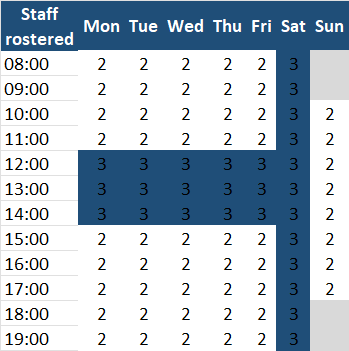
This repository — staffing-for-smes — ships with a full worked example. The scenario is a fictitious counter-service business — a café with a takeaway counter and an order-pickup point — open 8:00–20:00 Monday to Saturday and 10:00–18:00 on Sunday, with 26 weeks of point-of-sale tickets from 2 March to 30 August 2026. Each weekday has a hidden true arrival profile: a lunch peak and an after-work peak on weekdays, a Saturday that is busy all afternoon, a quieter Sunday that opens late. Every arrival becomes a ticket with a timestamp, a transaction type (takeaway, dine-in order, order pickup, return or enquiry), how long it took, its value and the payment method. The business’s current roster — the habit one — is written alongside: two people until noon, three from noon to three, two until close on weekdays; three all day Saturday; two all day Sunday. And, as in the earlier demos, a small share of rows is deliberately corrupted so the validation step has something real to catch.
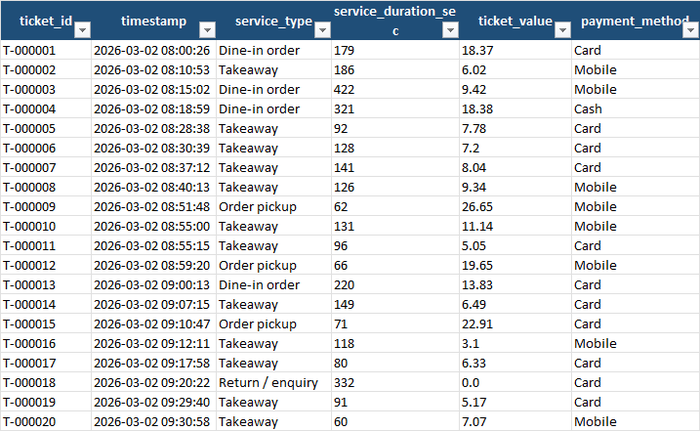
The raw ticket file has 77,941 rows. The validator rejected 1,560 of them (2.0%), each with a stated reason: 418 with blank or unparseable timestamps, 207 with a transaction type of “Delivery” that the business doesn’t offer, 199 with service times over an hour (a ticket left open), 198 stamped outside opening hours (a till clock error, or a manager closing out at 3 a.m.), 184 with negative values, 181 with a blank transaction type, 172 with a service time of zero or less, and one duplicated ticket id. What remained — 76,381 tickets, about 2,940 customers a week — is what every number in the workbook ran on:
The first thing the pipeline does is count. For each of the 80 weekday × hour slots the business is open, it averages the arrivals across the 26 observed days of that weekday:
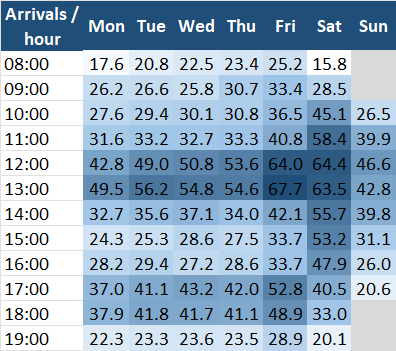
The picture is what the owner would have told you, but with numbers on it. Weekdays have two peaks — 43 to 68 an hour at 12:00–13:00, then 37 to 53 at 17:00–18:00 — and a trough between them (24 to 37 an hour on Monday to Thursday). Friday runs about 15% ahead of the other weekdays all day, and its 13:00 slot, at 67.7 an hour, is the busiest hour of the week. Saturday has no trough: it climbs from 16 at opening to 64 at noon and is still close to 48 at four in the afternoon. Sunday peaks at 47 at noon and is quiet by five.
The service-time side is measured too: a takeaway takes 120 seconds on average and is half of all tickets; a dine-in order 210; an order pickup 75; a return or enquiry 300, with the widest spread. Across everything, 153 seconds, and an average ticket of €10.24.
What the data says you need, and what you actually roster
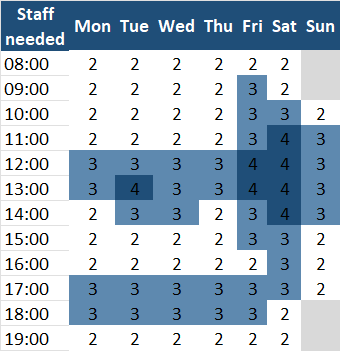
With arrivals and service time per slot, Erlang C gives the smallest number of people that serves 80% of customers within five minutes. The grid is the answer to the title question, hour by hour: Saturday needs four people from 11:00 to 15:00, three from 10:00 before that and until 18:00 after it, and two at the edges — a total of 36 staff-hours. Friday needs four at lunch and three for most of the rest of the day: 35 staff-hours. The other weekdays need three at lunch and three again from 17:00 to 18:00, two otherwise: 28 to
- Sunday needs three from 11:00 to 15:00: 20.
Now the roster the business actually runs:
And the difference:
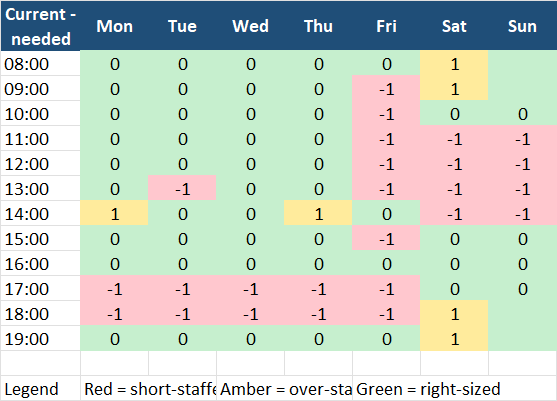
Three patterns jump out of the gap grid, and they are the three patterns most SME rosters share:
Saturday has the right number of hours in the wrong places. The roster puts 36 staff-hours on Saturday and the data says 36 are needed. But three people all day means one too many from 8:00 to 10:00 and again from 18:00 to 20:00 (amber), and one too few from 11:00 to 15:00 (red). Same wage bill, four hours of paid idleness and four hours of queues. This is the roster-shape problem, and no amount of hiring or cutting fixes it — only moving hours does.
Every weekday is short from 17:00 to 19:00. The habit roster drops back to two at 15:00, but the after-work peak from 17:00 needs three on all five weekdays. Ten red cells, one per evening hour per weekday, and between them they cost about €750 a week in lost contribution — more than the whole of Saturday.
Friday is a different day and is rostered like a Tuesday. It needs 35 staff-hours and gets 27. Eight of its twelve hours are short-staffed, and two of them — 17:00 and 18:00, with 53 and 49 arrivals an hour against two people — are overloaded: the arrival rate exceeds what two people can serve, so the queue does not clear until the rush ends. Sunday is the same story in miniature: two people all day against a noon rate that needs three, and the 12:00 slot runs at 99.7% utilisation.
What each of those hours costs
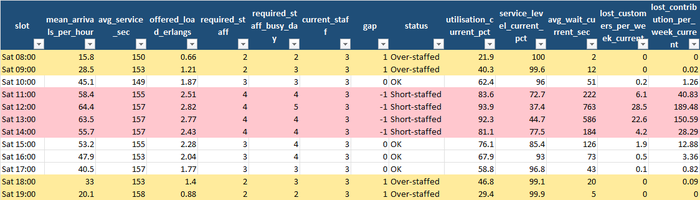
This is where the queueing formula earns its place, because it turns “a bit understaffed” into a wait time and a cost. Take Saturday at 12:00: 64.4 arrivals an hour, 157 seconds each, an offered load of 2.82 — meaning that on average 2.82 people are busy serving at any moment. With three on shift, that is 93.9% utilisation; the chance an arriving customer has to wait at all is 88.7%; only 37.4% are served within five minutes against the 80% target; and the average wait is 763 seconds — nearly thirteen minutes. Assuming customers give up after ten, that slot alone loses 28.5 customers a week, worth €189.50 of contribution. The 13:00 slot is nearly as bad (44.7% service level, 586-second wait, 22.6 lost). With a fourth person, both slots serve 95–96% within five minutes, and Saturday’s walk-outs fall from 64 a week to 6.
At the other end of the day, Saturday 08:00 with three people is 21.9% utilised, serves 100% within five minutes, and pays for one idle staff-hour — €14 — with no compensating benefit; the same at 09:00, 18:00 and 19:00. Across the whole of Saturday the roster loses 64 customers and €428 of contribution a week and pays €56 for idle hours: a total cost of €932 against €544 for the right-sized roster with the same 36 hours.
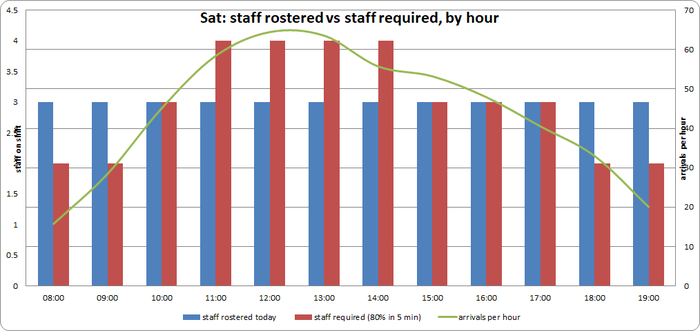
Friday is worse, because there is no idle time to trade:
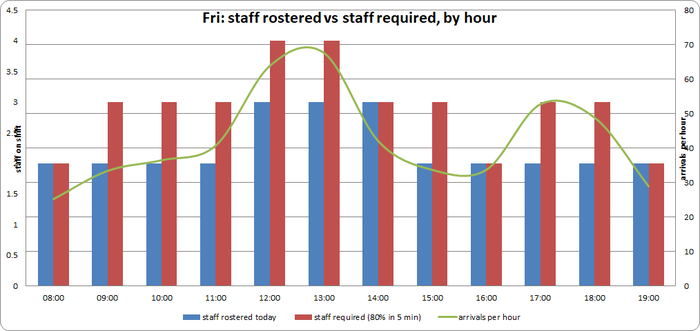
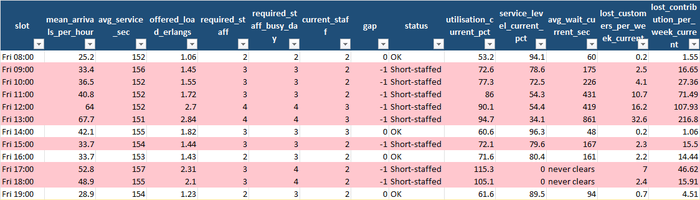
The 13:00 slot — 67.7 arrivals against three people — runs at 94.7% utilisation with a 14-minute average wait and loses 33 customers a week. At 17:00 and 18:00 the workbook prints never clears for the wait: 53 and 49 arrivals an hour against two people is more than two people can serve, so there is no steady-state queue, only a growing one. Friday as a whole serves 54.5% of customers within five minutes, loses 81 a week, and its total cost is €918 against €535 for the roster the data supports.
The whole week, and the price of the promise

Adding it up, the current roster runs 187 staff-hours a week where 206 are needed: 25 slots short, 6 over. It costs €2,618 in wages and €2,405 in lost contribution — the walk-outs are almost half the total — for €5,023 a week. The required roster costs €2,884 in wages, €266 more, but cuts lost contribution to €308: €3,192 a week. That is €1,831 a week, about €95,000 a year, and the achieved service level goes from 74.4% to 92.7%.

The last tab asks whether 80%-in-five-minutes was the right promise in the first place, by recomputing the roster at four targets:
| Target | Staff-hours / week | Wages / week | Lost contribution / week | Total / week | Saving vs today / year |
|---|---|---|---|---|---|
| Current roster | 187 | €2,618 | €2,405 | €5,023 | — |
| 70% within 5 min | 196 | €2,744 | €579 | €3,323 | €88,400 |
| 80% within 5 min | 206 | €2,884 | €308 | €3,192 | €95,200 |
| 90% within 5 min | 229 | €3,206 | €80 | €3,286 | €90,300 |
| 95% within 5 min | 246 | €3,444 | €32 | €3,476 | €80,500 |
The shape is the important thing. Going from the current roster to a 70% target recovers most of the money, because it fixes the overloaded hours. Going to 80% costs nine more hours and is still cheaper overall, because each of those hours saves more in walk-outs than it costs in wages. Beyond that, every extra person is buying seconds of waiting time for customers who would have stayed anyway: 90% costs €94 a week more than 80%, and 95% costs €284 more. The cheapest promise to keep, on this data, is the one in the middle.
The business impact, in real numbers
Put a cost on what the workbook found:
- About €95,000 a year, for 19 more staff-hours a week. The current roster is not cheap; it is expensive in a way that doesn’t appear on the payroll, because 361 customers a week walk out of queues. Fixing the shape of the roster costs €266 a week in wages and recovers €2,100 in contribution.
- Saturday needs no more hours, just different ones. Move the third person’s early and late hours (8–10, 18–20) to a fourth person at 11–15, and Saturday’s cost falls from €932 to €544 a week on the same 36 hours.
- The evening peak is the systematic miss. One more person from 17:00 to 19:00, Monday to Friday, is ten staff-hours a week — €140 — against roughly €750 of lost contribution.
- Friday and Sunday are rostered as if they were other days. Friday needs eight more hours than it gets and Sunday four; both have hours where the queue never clears.
- The promise has an optimum. 80% within five minutes is the cheapest target overall here; tightening to 95% would cost about €15,000 a year more than that for a queue almost nobody would notice.
- The data-quality dividend. Two percent of the tickets were unusable — and the 198 stamped outside opening hours would, unfiltered, have created phantom demand at 3 a.m. and a phantom requirement to staff it.
What to actually do with this, this week
- Export six months of tickets from the till or booking system: ticket id, timestamp, transaction type, how long it took, value. If the system doesn’t record duration, time twenty of each transaction type with a stopwatch and use the averages — the formula needs a mean service time per type, not a duration per ticket.
- Write down the current roster as a grid — weekday × hour × people on shift. Most businesses have never seen theirs written this way, and the shape is often a surprise before any analysis is run.
- Run the pipeline and start on the Staffing Gap tab. Red cells are where customers queue or leave; amber cells are where you pay for people the demand doesn’t use. A day whose total hours already match the requirement can still be badly rostered — the fix is moving hours from amber to red, not hiring.
- Read the Daily Summary for the title question, per day. Peak required staff and required staff-hours are the head-count and hours the data supports; total cost current against total cost required is what the habit is costing.
- Pick the target on the Cost Comparison tab, then build shifts around the grid. The grid is a requirement, not a shift plan: it doesn’t know about breaks, set-up, cleaning or who can work Saturdays. Use the busy-day column in Hourly Detail to decide where an on-call or flexible shift is worth having instead of a permanent extra person — 33 of the 80 slots need one more person on a busy day than on an average one.
- Re-run each quarter, or after any change in opening hours or menu. Arrival profiles drift with the seasons and with the neighbourhood.
Try it yourself: a demo you can run in minutes
To make this concrete, staffing-for-smes is a small, self-contained, open-source Python pipeline. It:
- Generates 26 weeks of fake point-of-sale tickets for a counter-service business with a hidden true arrival profile per weekday, day-to-day noise, four transaction types with different service times and values, and a configurable share of deliberately corrupted rows — plus the habit-based current roster and the hidden true arrival rates.
- Validates every row against a strict schema — including an inside-opening-hours rule and a plausible-service-time rule — drops duplicates, and writes a rejection report with a reason for every dropped row.
- Computes arrivals and service time per weekday × hour slot, applies Erlang C to find the minimum staff for the service-level target, compares it with the current roster, prices idle time and walk-outs, sweeps the service-level target, and writes it all into a single 10-tab Excel workbook.
Downloading the code (no Git experience needed)
You don’t need to know Git or the command line to get the code onto your computer:
- Go to the repository: github.com/MattProtopapas/staffing-for-smes
- Click the green
<> Codebutton near the top of the page. - Click “Download ZIP” in the dropdown.
- Right-click the downloaded ZIP and choose “Extract All…“ to unzip it into a regular folder.
- Open that folder — that’s the project. Ask your AI tool of choice (I used Claude) to
set up a Python environment and install the dependencies listed in
requirements.txt— no coding experience required to get it running.
If you’re comfortable with Git,
git clone https://github.com/MattProtopapas/staffing-for-smes.git does the same thing
in one step.
Running the demo
The repository includes a full README.md, but the short version, from PowerShell
(requires Python 3.10+; the Erlang C maths is written with the standard library’s math
and statistics modules — no numpy, scipy or pandas needed, so you can read exactly what
the formula is doing):
python -m venv .venv
.\.venv\Scripts\Activate.ps1
pip install -r requirements.txt

python generate_data.py --weeks 26 --seed 42   # step 1: fake tickets + current roster + hidden true arrival rates
python validate_data.py                        # step 2: schema checks, rejection report
python analyze_staffing.py                     # step 3: Erlang C grid, gap, costs -> 10-tab Excel workbook
Then open output/staffing_analysis.xlsx. With --seed 42 you’ll get exactly the numbers
quoted in this post; the workbook committed to the repository was produced the same way,
so you can also just browse it on GitHub without running anything. (Unlike the last two
demos, the history here starts on a fixed date — Monday 2 March 2026 — so the labels will
match whenever you run it.)
Options worth playing with: --base-rate scales how busy the business is (40 arrivals an
hour at a normal hour by default, with peaks about 1.6× that); --service-level 0.9 on the
analysis step changes the promise the grid is built to; --error-rate 0 gives a perfectly
clean file; a different --seed gives a different six months. The assumptions that are
policy rather than parameters live at the top of staffing_common.py: the opening
hours, TARGET_WAIT_SECONDS (300), PATIENCE_SECONDS (600 — how long a customer waits
before leaving), HOURLY_WAGE (14.00, fully loaded), CONTRIBUTION_MARGIN_PCT (0.65) and
MIN_STAFF_WHEN_OPEN (1). Change the wage and the margin to yours before believing the
cost tabs.
Every input and output path is defined in one place in staffing_common.py, so once
you’re comfortable with the demo you can drop your own ticket export and a CSV of your
actual roster — matching the column layouts there — into data/, skip
generate_data.py entirely, and run validate_data.py and analyze_staffing.py straight
on your own business.
Note: the sample data shipped with this repo is synthetic and randomly generated, and this project is intended for educational and demonstration purposes only — see the repository’s Disclaimer & EULA for details. It’s a starting point for understanding how queueing-based staffing works, not a workforce-management system.
Understanding the results
The workbook — output/staffing_analysis.xlsx — has ten tabs, in the order you should
read them.
The input. Input Data is the validated ticket file exactly as the analysis read it.
Alongside it, data/validation_report.txt lists every rejected row and why.
The four grids. Arrivals Heatmap — mean customers per hour, weekday × hour,
colour-scaled. Required Staff — the minimum head-count per slot for the service-level
target. Current Roster — what the business rosters today, read from
data/current_roster.csv. Staffing Gap — current minus required, red / amber / green.
These four are the whole story for most readers.
The evidence. Hourly Detail — one row per slot with everything behind the grids: arrivals (mean and standard deviation), average service time, offered load, required staff on an average and on a busy day, current staff, gap, utilisation, probability of waiting, service level, average wait, expected walk-outs and lost contribution per week, idle hours and idle cost, and the wage cost under each roster. Because this is a demo, the hidden true arrival rate and the staff it implies are added for comparison — the estimate from 26 weeks of data was within 1.7 arrivals an hour of the truth on average, and the required head-count matched the truth-implied one in 73 of 80 slots, the other seven being one person out where the true rate sat close to a threshold.
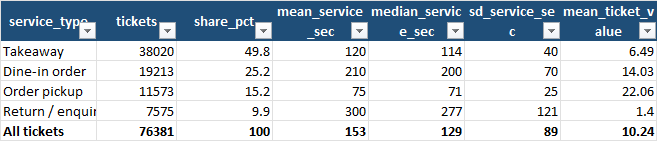
Service Times shows how long each kind of transaction really takes and what it is worth — the returns-and-enquiries line, five minutes each for an average value of €1.40, is the one to think about.
The decisions. Daily Summary answers the title question per weekday — peak required staff, required staff-hours, and total cost current against required. Cost Comparison puts the current roster beside the required roster at each service-level target, weekly and annualised. Method Notes explains every column in plain language.
The limits worth keeping in mind
Queueing analysis, like every tool covered on this blog, is genuinely useful within real limits:
- Erlang C assumes random arrivals, exponential service times and infinitely patient customers. Real arrivals come in clumps (a bus, a school run), real service times have a long tail, and real customers leave — which is why the walk-out estimate is bolted on separately. Treat the required-staff grid as a well-founded starting point, not a law.
- Whole-hour slots hide within-hour surges. Saturday 12:00 averages 64 an hour, but twenty minutes of it may run at 90. If your business has sharp surges, re-run the analysis on half-hour slots (the code groups by hour; it is a one-line change).
- A staffing grid is not a shift plan. Breaks, set-up and cleaning time, minimum shift lengths, who is trained for what, and employment rules are all missing. The grid tells you where the hours need to be; building lawful, humane shifts around it is the next job.
- The patience, wage and margin assumptions drive the money numbers. Ten minutes’ patience, €14 an hour and a 65% margin are illustrative. Halve the patience and lost contribution roughly doubles; use your own figures before quoting a saving.
- Six months is one season. A café’s December is not its June. Run the analysis on a window that matches the period you are rostering for, and re-run when the season changes.
- The data only records customers who joined the queue. Someone who saw the line through the window and didn’t come in is not a ticket. The real walk-out number is likely higher than the estimate, not lower.
None of that diminishes the core value. The till already records every arrival. The formula was published by Agner Krarup Erlang in 1917 for telephone exchanges and has staffed every call centre since. What it changes is not that you know exactly how many people to put on a Saturday, but that you know, hour by hour, where the queue is and where the idle time is — and that, rather than “it’s always been three,” is what tells you which hours to move.