Ask the owner of a small online shop whether last year’s Black Friday email worked and the answer is immediate: “Yes — sales were up.” Ask how they know the discount code caused it and the answer slows down: “Well, we sent the email and then sales went up.” Ask whether the people who used the code would have bought anyway, whether they spent less because of the discount, or whether the same week without the email would have been just as busy, and the conversation usually ends with a shrug and “it felt like it worked.”
This blog keeps returning to the same idea: replace gut feel with a number. The lead conversion post measured each stage of the funnel; the pricing post two weeks ago worked out, from history, how deep a discount can go before it destroys contribution; the SPC post asked whether a change in a number was a signal or just noise. This post puts those together for the most common decision an SME marketer makes: did that promotion work, or did we just get lucky? A/B testing — a controlled split, the two-proportion z-test, a confidence interval and a sample-size calculation — turns “sales were up” into “the discount email converted at 4.05% against 3.22% for the plain one, a 26% lift that is unlikely to be chance (p = 0.028); but the people who used it spent €9 less each, so revenue per email was up only 8%, and the test was too small to tell whether that is real.”
For a small or medium-sized company this matters because the tests are small. A company that emails ten thousand people cannot borrow the intuitions of one that emails ten million: with a few hundred conversions in each group, the difference between a real effect and a lucky fortnight is genuinely hard to see, and the most common mistake is not running a bad test but believing a result that the sample size could never have supported. The good news is that the arithmetic that separates the two has been standard since the 1900s, needs no statistics software, and fits in an Excel workbook.
The traditional way this gets handled is before-and-after: promotion week against the week before it, judged on total sales. What’s missing is a control group that received the same week — so seasonality, Black Friday and the weather cancel out — and a stated rule, decided before the test, for how big a difference counts and how many people it takes to see it.
What A/B testing actually gives you
| Benefit | Why it matters for an SME |
|---|---|
| A fair comparison | Half the list gets the usual email, half gets the variant, sent on the same days. Whatever else happened that fortnight — Black Friday, payday, the weather — happened to both groups equally. That is what a before/after comparison can never give you. |
| A test of whether the difference is noise | The two-proportion z-test asks: if the two emails were truly identical, how often would a split this size produce a gap this large by chance? That probability is the p-value. Below 5% is the usual bar. The chi-square test asks the same question and gives, for a 2×2 table, exactly the same answer. |
| A range, not just a verdict | The 95% confidence interval for the difference says which lifts the data are consistent with. If it includes zero, “no effect” is one of them. If its low end is still worth acting on, you have a decision. |
| The money metric, not just the conversion metric | A discount raises conversion and lowers basket size. Welch’s t-test on revenue per recipient — every recipient, buyers and non-buyers alike — is the test of whether the promotion paid. Conversion alone will flatter almost any discount. |
| What the test you ran could actually see | Achieved power and the minimum detectable effect say how big a real effect would have to be for this sample to reliably find it. A “not significant” result on an underpowered test says almost nothing. |
| How big the next test needs to be | Recipients per group to detect a stated lift at a stated significance and power, and — at your daily send volume — how many days that takes. Decide this first; look at the result once. |
| A health check on the split | If you planned 50/50 and the data shows 47/53 with thousands of recipients, the randomiser or the export is broken. The sample-ratio check catches that before you trust anything else. |
| Bad data never reaches the test | A validation layer rejects invalid group labels, clicks without opens, orders without conversions, negative order values and duplicate customers, each with a stated reason. |
A practical example, using this repo’s own results
This repository — ab-testing-promos-for-smes — ships with a full worked example. The scenario is a fictitious small online retailer’s Black Friday campaign: 10,000 recipients, randomly split between a control email (the usual newsletter) and a treatment email carrying a discount code, sent in daily batches of about 700 over two weeks from 17 to 30 November 2025 — Black Friday itself falling on the 28th. Each recipient is tagged new or returning, and the data records whether they opened, clicked, converted, and how much they spent. The hidden truth is built the way real campaigns behave: the treatment genuinely converts better but its buyers spend less (people use a discount on things they were going to buy anyway); weekday and Black Friday seasonality hits both groups equally; and a novelty boost makes the treatment look best in its first few days before fading. And, as in the earlier demos, a small share of rows is deliberately corrupted so the validation step has something real to catch.
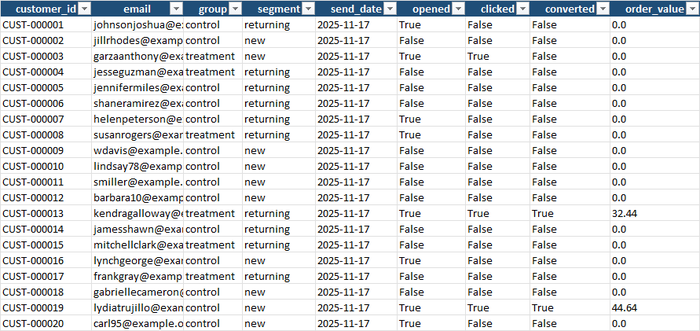
The raw file has 10,001 rows. The validator rejected 201 of them (2.0%), each with a stated reason: 41 with a group label that was neither control nor treatment, 29 with dates that don’t exist, 28 with a blank customer id, 24 that clicked without opening, 24 with a negative order value, 20 with an order value but no conversion, 18 that converted with no order value, 16 with a segment of “vip” that isn’t defined, and one duplicated customer. What remained — 9,800 recipients, 4,937 control and 4,863 treatment — is what every test in the workbook ran on:
The Results tab opens with the plain comparison and the health check:
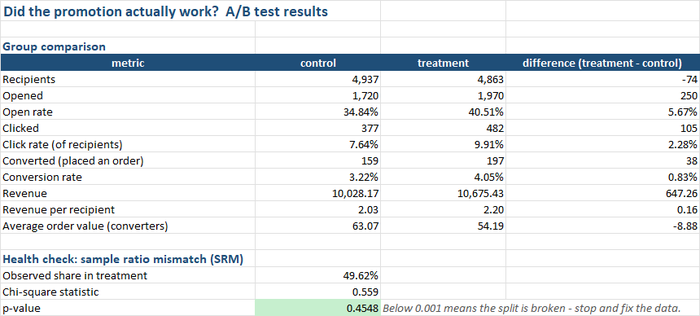
Read down and the story is already visible before any statistics: the treatment email was opened more (40.5% against 34.8%), clicked more (9.9% against 7.6%) and converted more (4.05% against 3.22%). It also brought in more revenue: €10,675 against €10,028. But its average order was €54.19 against €63.07 — the discount shaved nearly nine euros off each basket — so revenue per recipient, the number that pays for the campaign, was €2.20 against €2.03. And the split landed 49.6% treatment, a chi-square p-value of 0.45: the randomiser worked.
Did conversion really go up? Yes.
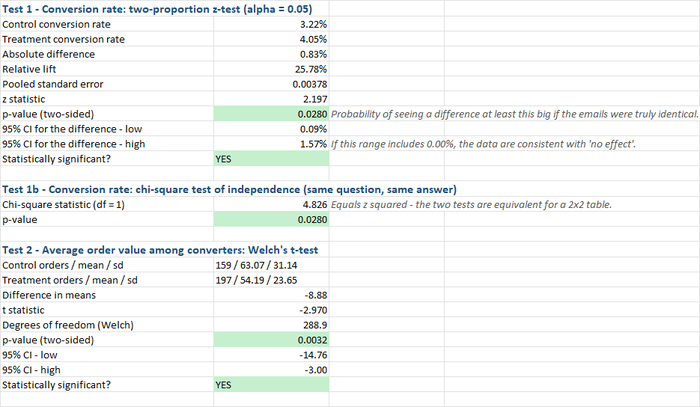
The two-proportion z-test puts the absolute difference at 0.83 percentage points with a pooled standard error of 0.38, a z of 2.197 and a two-sided p-value of 0.028. If the two emails were truly identical, a split of this size would produce a gap this big about once in 36 tries. The 95% confidence interval runs from +0.09 to +1.57 percentage points — it excludes zero, so the verdict is significant. The chi-square test on the same 2×2 table gives a statistic of 4.826, which is 2.197 squared, and the same p-value; the workbook shows both so that anyone who has been told “you should use chi-square” can see they are the same test.
The basket result is stronger still: Welch’s t-test on the 159 control orders against the 197 treatment orders gives a difference of −€8.88, t = −2.97, p = 0.003, with a confidence interval from −€14.76 to −€3.00. The discount did what discounts do — it brought in more buyers who each spent less.
Did the promotion make money? Nobody can tell.
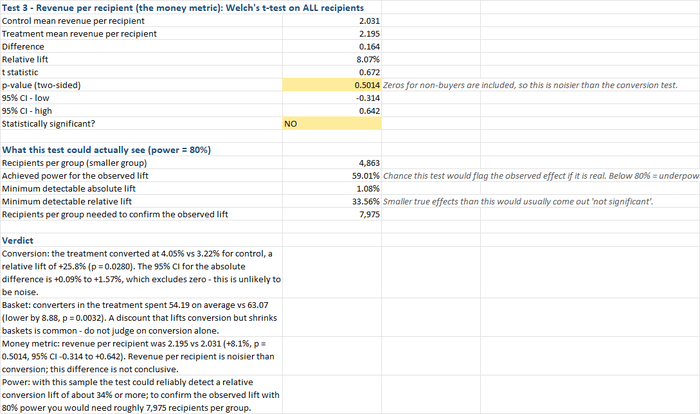
Here is the part the “sales were up” conversation never reaches. Revenue per recipient rose from €2.031 to €2.195 — a relative lift of 8.1% — but this metric includes a zero for every one of the 9,444 people who didn’t buy, which makes it far noisier than the conversion rate. The t-statistic is 0.67, the p-value is 0.50, and the confidence interval runs from −€0.31 to +€0.64 per recipient. The data are consistent with the promotion having lost money, made nothing, or added a third to revenue per email. On the metric that matters, this test is inconclusive.
That is not a failure of the test; it is the test telling you its own limits, and the next block quantifies them. With 4,863 in the smaller group and a 3.2% baseline, the achieved power for the observed conversion lift was 59% — meaning that even if the 26% lift is exactly real, a test this size would flag it only three times in five. The minimum detectable relative lift at 80% power is 33.6%: anything smaller than a one-third improvement in conversion would usually have come out “not significant” on this sample, real or not. To confirm the observed lift with proper power would take about 7,975 recipients per group — 16,000 in total, not 10,000.
The peeking problem, drawn
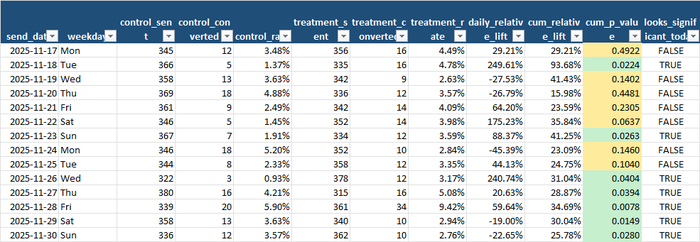
The Daily Breakdown tab answers a question every owner asks during a test: can I look yet? For each of the fourteen days it recomputes the z-test on everything sent so far, as if you had checked the dashboard that evening:
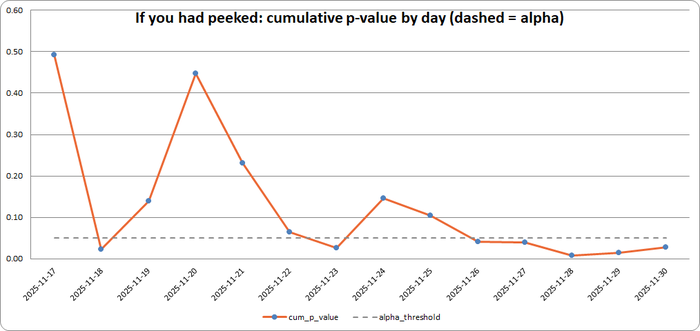
On day two the cumulative p-value was 0.022 — significant, stop the test, roll out the discount. By day four it was 0.448 — nothing there, cancel it. Day seven, 0.026. Day nine, 0.104. It dipped under the line on seven of the fourteen days and finished at 0.028. Someone checking daily and stopping at the first green light would have “found” a significant result on day two with 1,400 recipients, and the daily relative lift that day was +250% — a number that would have gone straight into next year’s plan. The chart is the single best argument for deciding the sample size first and looking once.
The daily conversion rates explain why the line wanders:
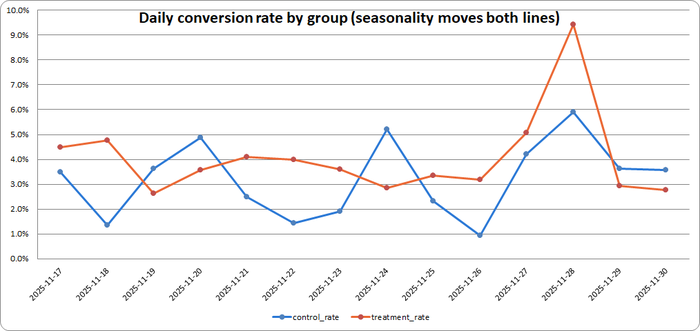
Both groups fall at the weekends and both jump on Black Friday — control converted at 5.9% that day, treatment at 9.4%, and that single day pulled the cumulative p-value to its lowest point (0.008). Because the groups were split on the same days, the seasonality cancels out of the comparison; a before/after test — promotion week against the week before — would have attributed the whole Black Friday spike to the discount code. The same tab also shows the novelty effect the generator planted: over the first week the treatment’s lift was +41%; over the second, +14%. Two weeks was long enough to see it fade; one would not have been.
Slicing until something is significant

The natural next move after a mixed result is to slice: maybe it worked for new customers? The Segments tab runs the same test by segment and finds a +29% lift among new customers (p = 0.095) and +25% among returning (p = 0.123) — neither significant on its own, and the Bonferroni column reminds you that testing two segments means each one needs to clear 0.025, not 0.05, to count. Every extra slice is another 5% chance of a fluke; a segment that lights up is the hypothesis for the next test, not the conclusion of this one.
The business impact, in real numbers
Put a cost on what the workbook found:
- The discount email really does convert better — 4.05% against 3.22%, and the confidence interval says the true lift is somewhere between a hair and 1.6 points. That much is settled.
- It does not, on this evidence, make more money. Revenue per recipient was up 8%, but the interval runs from −15% to +32%. Judged on the metric that pays the bills, a €10,000 campaign decision would be made on a coin flip.
- The test was too small by about 60%. Confirming the observed lift at 80% power needs roughly 8,000 per group; detecting a more modest 15% lift needs 22,481 per group — 45,000 recipients, or 65 days (ten weeks) at 700 sends a day.
- Peeking would have produced the wrong answer half the time. On seven of fourteen evenings the running p-value said “significant” and on seven it said “not.” Whichever day you happened to look decided the result.
- The novelty effect was worth 27 points of lift in week one that had gone by week two. Any test that runs less than two full weekly cycles is measuring surprise, not behaviour.
- The data-quality dividend. Two percent of rows were unusable, including 41 with a group label that would have quietly created a third arm and 24 people who clicked an email they never opened.
What to actually do with this, this week
- Decide the metric before the test. For a discount, that is revenue (or better, contribution) per recipient — the pricing post has the break-even arithmetic. Conversion rate is a diagnostic, not the verdict.
- Size the test with the calculator tab before sending anything. Type in your baseline conversion, the smallest lift that would change your decision, and your daily send volume; it tells you recipients per group and days to run. If the answer is “ten weeks,” that is the answer — a two-week test that can only see a 34% lift is not a cheaper test, it is a test of a different, less useful question.
- Randomise properly and check the split. Assign customers to groups by a random number, not by list order or surname, and confirm the sample-ratio check passes before reading any other row.
- Run for whole weeks, and at least two of them. Both groups must cover the same calendar days; the test must outlast the novelty of the new thing.
- Look once, at the end. If you must monitor, watch for data problems (a broken link, a bounced batch), not for significance.
- Treat segment results as next quarter’s hypothesis. Pre-register one metric and one population; anything else you find is a lead, not a result.
Try it yourself: a demo you can run in minutes
To make this concrete, ab-testing-promos-for-smes is a small, self-contained, open-source Python pipeline. It:
- Generates a fake campaign — recipients split at random between control and treatment, sent in daily batches over a two-week window around Black Friday, with a treatment that converts better but has smaller baskets, seasonality shared by both groups, a decaying novelty boost, and a configurable share of deliberately corrupted rows.
- Validates every row against a strict schema — including the funnel rules that you cannot click without opening, convert without clicking, or have an order value without an order — drops duplicates, and writes a rejection report with a reason for every dropped row.
- Runs the two-proportion z-test, the chi-square test, Welch’s t-test on basket value and on revenue per recipient, the sample-ratio check, the power and minimum-detectable-effect calculation, the day-by-day peeking replay and the segment breakdown, and writes it all into a single 6-tab Excel workbook — including a live sample-size calculator with editable cells.
Downloading the code (no Git experience needed)
You don’t need to know Git or the command line to get the code onto your computer:
- Go to the repository: github.com/MattProtopapas/ab-testing-promos-for-smes
- Click the green
<> Codebutton near the top of the page. - Click “Download ZIP” in the dropdown.
- Right-click the downloaded ZIP and choose “Extract All…“ to unzip it into a regular folder.
- Open that folder — that’s the project. Ask your AI tool of choice (I used Claude) to
set up a Python environment and install the dependencies listed in
requirements.txt— no coding experience required to get it running.
If you’re comfortable with Git,
git clone https://github.com/MattProtopapas/ab-testing-promos-for-smes.git does the same
thing in one step.
Running the demo
The repository includes a full README.md, but the short version, from PowerShell
(requires Python 3.10+; every statistic is plain standard-library Python in ab_stats.py
— no scipy or numpy — and test_ab_stats.py checks them against textbook values):
python -m venv .venv
.\.venv\Scripts\Activate.ps1
pip install -r requirements.txt

python generate_data.py --count 10000 --error-rate 0.02 --seed 42   # step 1: fake campaign split
python validate_data.py                                              # step 2: schema + funnel checks, rejection report
python analyze_ab_test.py                                            # step 3: tests, CIs, peeking replay, calculator -> 6-tab Excel workbook
Then open output/ab_test_analysis.xlsx. With --seed 42 you’ll get exactly the numbers
quoted in this post; the workbook committed to the repository was produced the same way,
so you can also just browse it on GitHub without running anything. The send dates are
fixed (17–30 November 2025), so the labels match whenever you run it.
The generator’s options are the interesting part of this demo, because they let you create the situations the Pitfalls tab warns about and watch the tests respond:
--treatment-rate 0.03— a promotion with no real effect at all. Re-run a few seeds and count how often the peeking chart still dips under 0.05 on some day.--count 2000— a small list. The observed lift may be large; the confidence interval will straddle zero and the minimum detectable lift will be enormous.--novelty 2 --days 21— a strong novelty effect. Compare the first- and third-week rows on the Daily Breakdown tab.--treatment-share 0.45— a broken randomiser. The sample-ratio check should fire.
On the analysis side, --alpha, --power and --mde-rel set the significance level,
the target power and the lift the next test should be able to detect (they pre-fill the
calculator), and --daily-recipients overrides the observed send volume for the
“how long to run” estimate.
Every input and output path is defined in one place in ab_common.py, so once you’re
comfortable with the demo you can drop your own campaign export — one row per recipient
with a group, a send date, the opened / clicked / converted flags and the order value —
into data/, skip generate_data.py entirely, and run validate_data.py and
analyze_ab_test.py straight on your own campaign.
Note: the sample data shipped with this repo is synthetic and randomly generated, and this project is intended for educational and demonstration purposes only — see the repository’s Disclaimer & EULA for details. It’s a starting point for understanding how controlled experiments and their statistics work, not an experimentation platform.
Understanding the results
The workbook — output/ab_test_analysis.xlsx — has six tabs.
The verdict. Results — the group comparison, the sample-ratio health check, each test with its statistic, p-value and confidence interval (green where significant, amber where not), the achieved power and minimum detectable effect, and a plain-English verdict in four sentences. It is the one tab to hand to whoever signs off the next campaign.
The input. Input Data is the validated recipient file exactly as the tests read it.
Alongside it, data/validation_report.txt lists every rejected row and why.
The evidence. Daily Breakdown — the per-day funnel for each group, the daily lift, the cumulative p-value as of each evening, and the two charts above. Segments — the same z-test by customer segment with the Bonferroni-corrected threshold beside it.
The planning tool. Sample Size Calculator — edit the yellow cells (baseline rate, lift to detect, alpha, power, daily volume, split) and the sheet recalculates recipients per group, total, and days and weeks to run; below it, a pre-computed table across lift sizes and a second calculator for testing basket value instead of conversion:
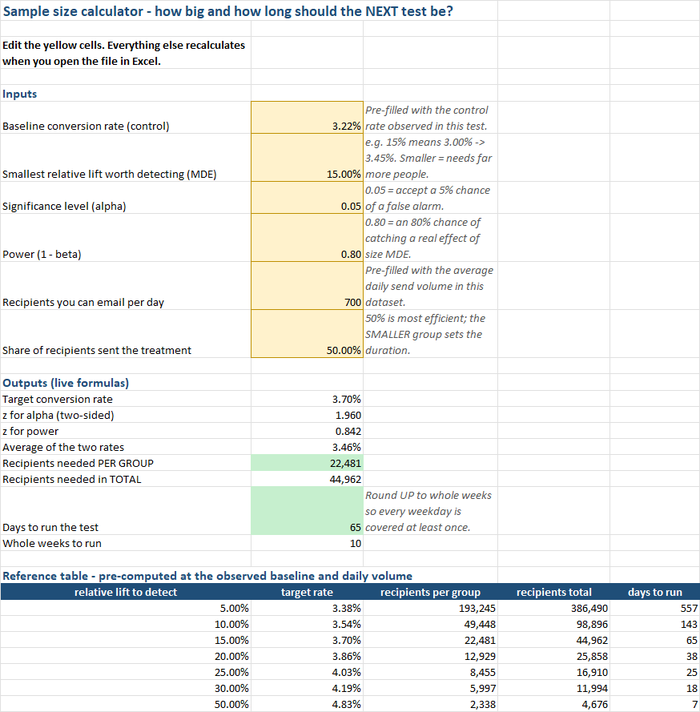
The reference table is worth a long look: to detect a 5% lift on this baseline you would need 193,000 recipients per group — a year and a half of sends. That is not a reason not to test; it is a reason to test changes big enough to matter.
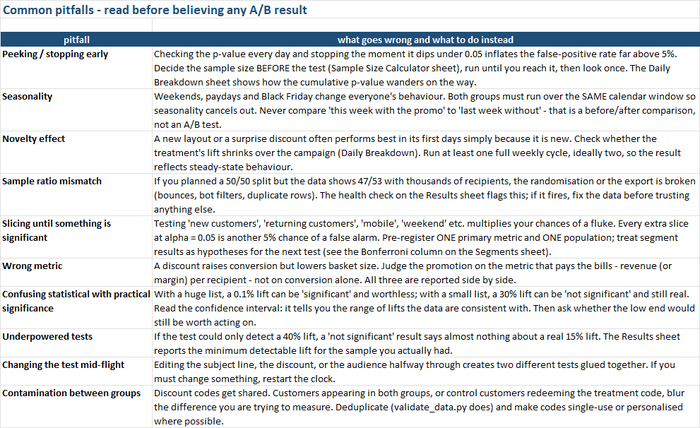
The checklist. Pitfalls — ten ways this kind of analysis goes wrong, each with what to do instead:
The limits worth keeping in mind
Controlled testing, like every tool covered on this blog, is genuinely useful within real limits:
- Significance is not importance. With a huge list, a 0.1% lift can be “significant” and worthless; with a small one, a 30% lift can be “not significant” and still real. Read the confidence interval, and ask whether its low end would still be worth acting on.
- A test measures the fortnight it ran in. A discount that lifts conversion in Black Friday week may do nothing in February, and a code that works once may train customers to wait for the next one. Repeat the test in an ordinary week before making it policy.
- Revenue per recipient is a noisy metric, and margin per recipient is the right one. The workbook stops at revenue because that is what a campaign export contains. If the discount is 15% and the margin is 40%, the treatment’s €54 basket is worth a good deal less than 86% of the control’s €63.
- Discount codes leak. Control customers who redeem the treatment code, and customers who appear in both groups, blur the very difference you are measuring. Single-use or personalised codes and deduplication are part of the design, not an afterthought.
- The tests assume independence. Two recipients in the same household, or one customer with two email addresses, break it slightly; a share on social media that brings in non-recipients breaks it more. Neither is fatal, but both push the true uncertainty wider than the interval shows.
- The demo’s effect sizes are generous. A real promotion that lifts conversion by 26% is a good one. Many real changes — a subject line, a button colour — move it by a few percent, which is why the reference table’s top rows run to six figures and most such tests should not be run at all by a business with a ten-thousand-name list.
None of that diminishes the core value. The campaign export already exists. The z-test is the one Karl Pearson and his students were using before the First World War, and the arithmetic runs in a spreadsheet. What A/B testing changes is not that you know whether the promotion worked, but that you know how sure you can be — and, when the honest answer is “not very,” how many more people it would take to find out before the next Black Friday.